Checking usage
See how many credits FansBot is using, broken down by request type, model, and platform.
FansBot usage is billed in credits. To see what it's spending, open Usage in your OnlyFansAPI dashboard sidebar and switch to the FansBot tab.
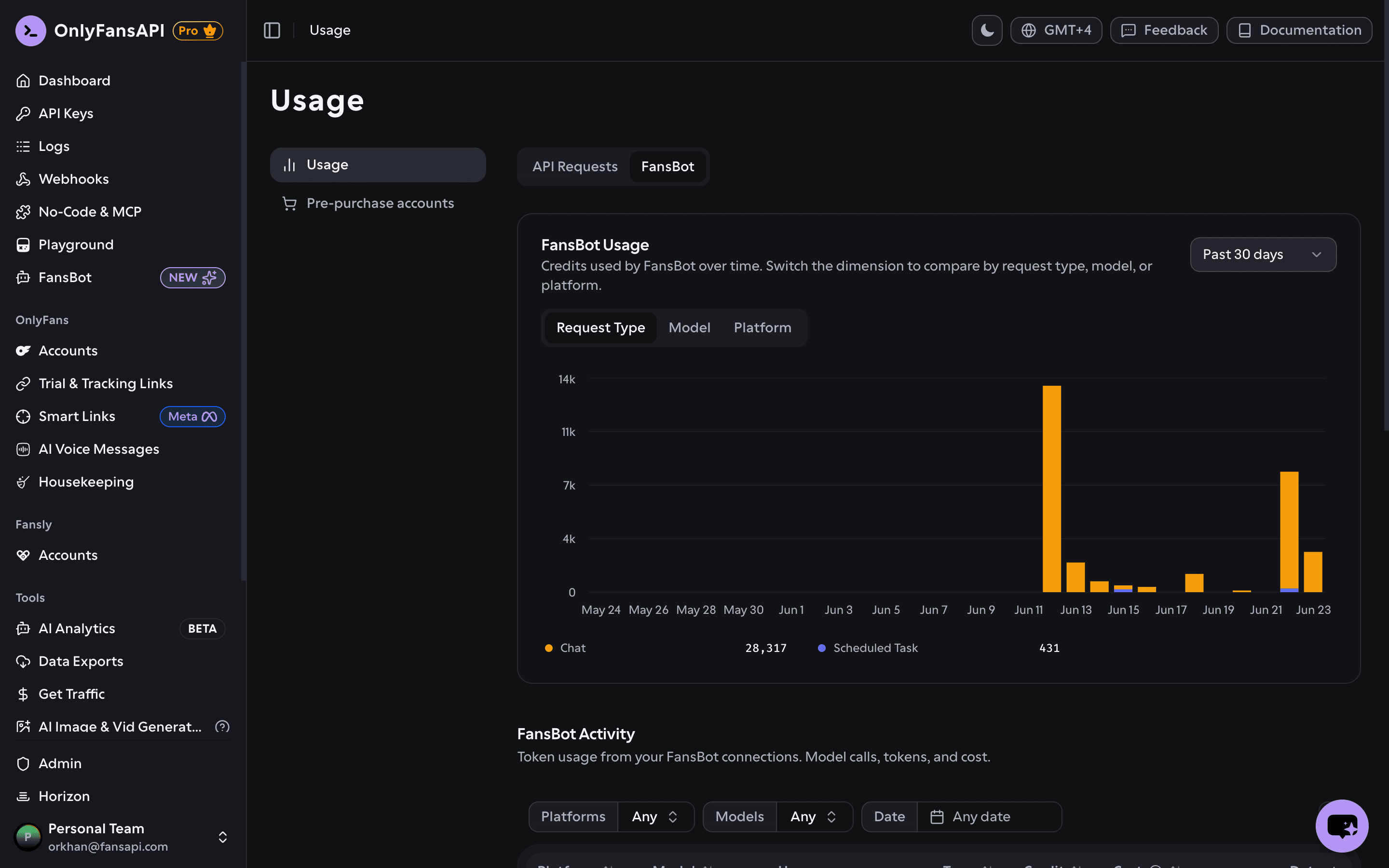
Usage chart
The chart shows credits used by FansBot over time. Use the controls to dig in:
- Dimension — group the chart by Request Type (for example, chat vs. scheduled task), Model, or Platform.
- Period — Today, the past 7 or 30 days, the past 6 months, the past year, or all time.
Activity table
Below the chart, FansBot Activity lists individual requests — model calls, tokens, and cost:
| Column | What it shows |
|---|---|
| Platform | Telegram, Slack, or Discord |
| Model | The AI model that handled the request |
| User | Who triggered it |
| Type | Chat, scheduled task, and so on |
| Credit | Credits the request cost |
| Cost | The equivalent cost |
| Date | When it ran |
Filter by Platform, Model, or date range to narrow it down.
What about web search?
When FansBot searches the web, that's billed at a flat rate per search (rather than per token) and shows up in the activity breakdown alongside your chat and scheduled-task usage.
Running low? Top up from Billing in your dashboard.